How to Send High Resolution Pictures and Videos on WhatsApp
With over 2 billion monthly active users, WhatsApp is the world’s most popular instant messaging service. It is widely preferred for chatting, video calling, and sharing media files with your friends and family on the platform. However, WhatsApp has been disliked for compressing the size of media files shared through it.
Thankfully, you can now share HD-quality pictures and videos on WhatsApp with ease. But is there anything you need to know about sending photos and videos in HD quality on WhatsApp? Read below to find out.
What to Know About Sharing HD Quality Pictures and Videos on WhatsApp
While you can send full-resolution pictures and high-quality videos on WhatsApp, there’s a lot you need to know about this feature.
- WhatsApp allows sending a high-quality photo only if it has adequate resolution. That means the HD sharing option will not appear for low-resolution images.
- The high-quality picture-sharing feature only applies to sending pictures as media files through a WhatsApp chat. It does not apply to images shared through status updates.
- All photos you send in HD quality will appear in the chat with an “HD” tag.
- Choosing the high-quality option for sending pictures doesn’t mean that your image will be shared in its original quality. WhatsApp will share photos in up to 12MP resolution with light compression applied. Anything higher and the resolution will be reduced to around 12MP.
- WhatsApp will let you send videos in up to 720p resolution. Videos of higher resolution will be automatically downscaled to 720p for this.
You can share HD-quality photos and videos on WhatsApp even if you signed up without your phone number.
How to Send HD-quality Pictures on WhatsApp
Sending an HD-quality picture is as easy as sharing any other media file on WhatsApp.
- Launch WhatsApp and open the chat where you want to send a high-resolution picture.
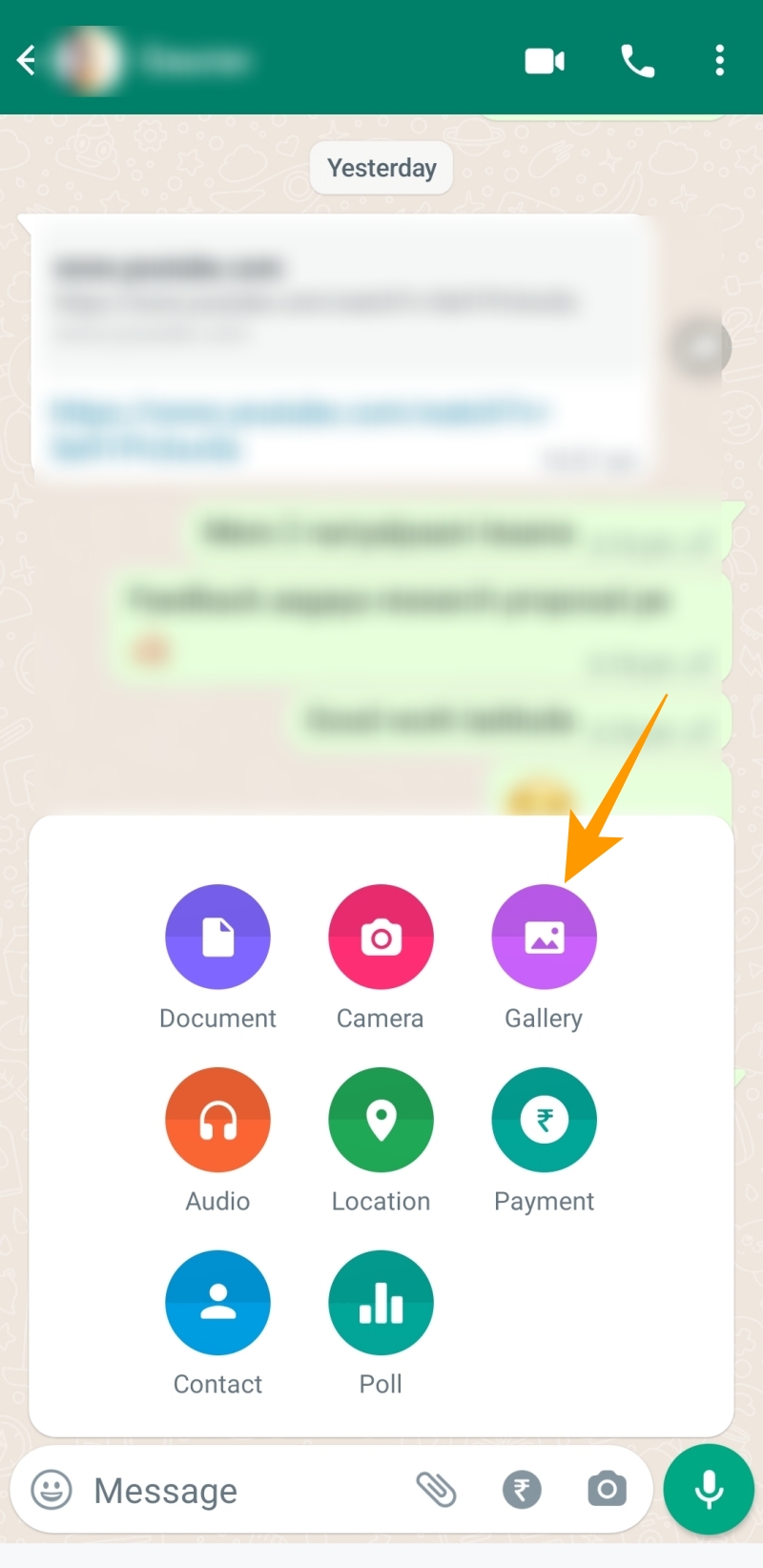
- Tap the paper clip icon given alongside the typing field.
- From the pop-up that appears, tap Gallery.

- Choose a high-quality image you want to share from the gallery.
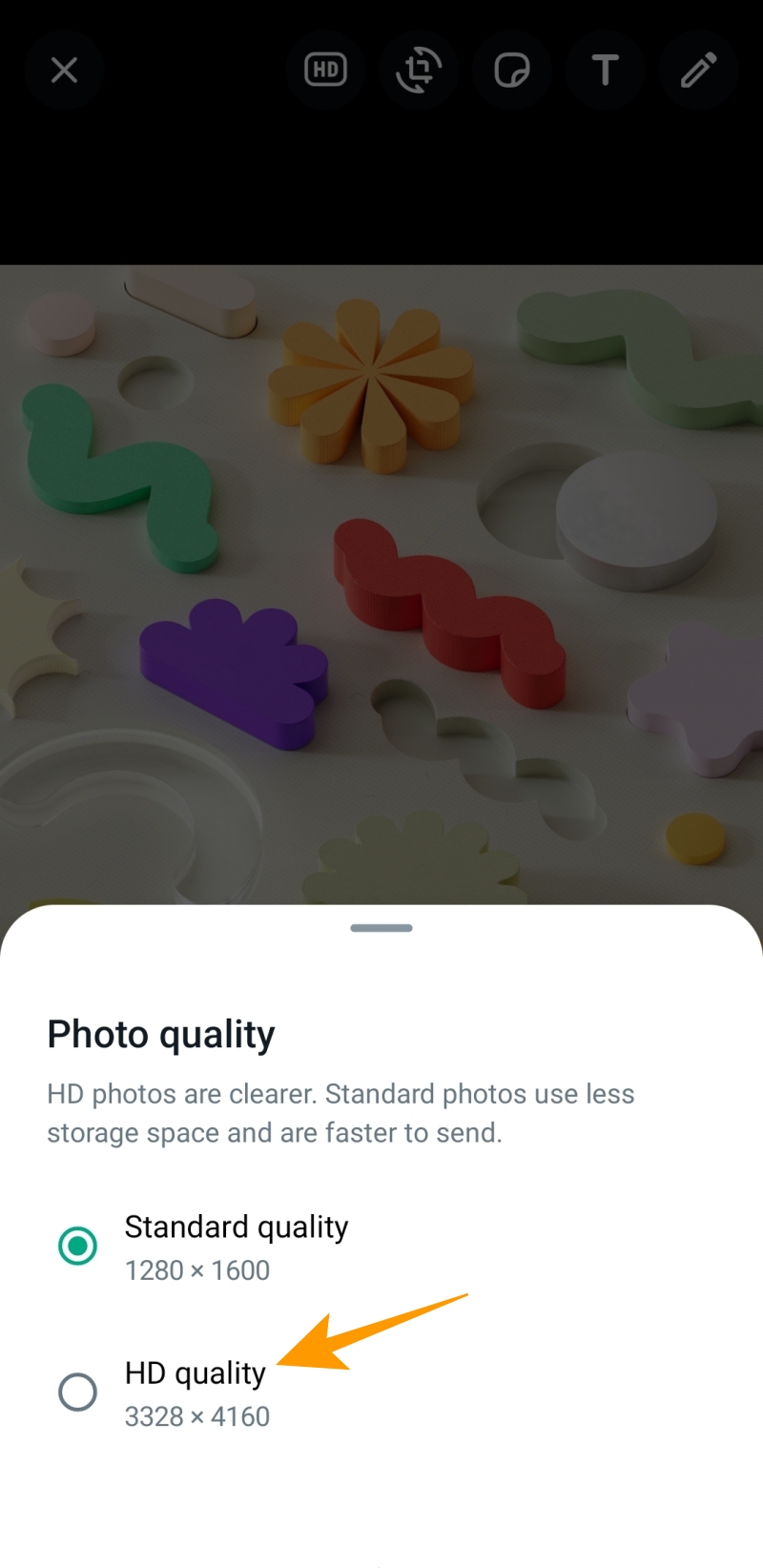
- Tap the HD option from the top toolbar.
- Now, select your desired picture quality from the Photo quality popup.
- Once done, tap the send icon to share the picture in HD quality.
How to Send HD-quality Videos on WhatsApp
Apart from sharing photos in HD quality, you can also send videos in HD resolution on WhatsApp. While 720p resolution videos will take more space, the jump in quality will be worth it. The process of HD video sharing on WhatsApp is very similar to regular videos.
- Open WhatsApp and open the chat in which you want to send an HD video.
- Choose the paperclip icon given alongside the typing field.
- Tap the Gallary option and choose the HD video you want to send.
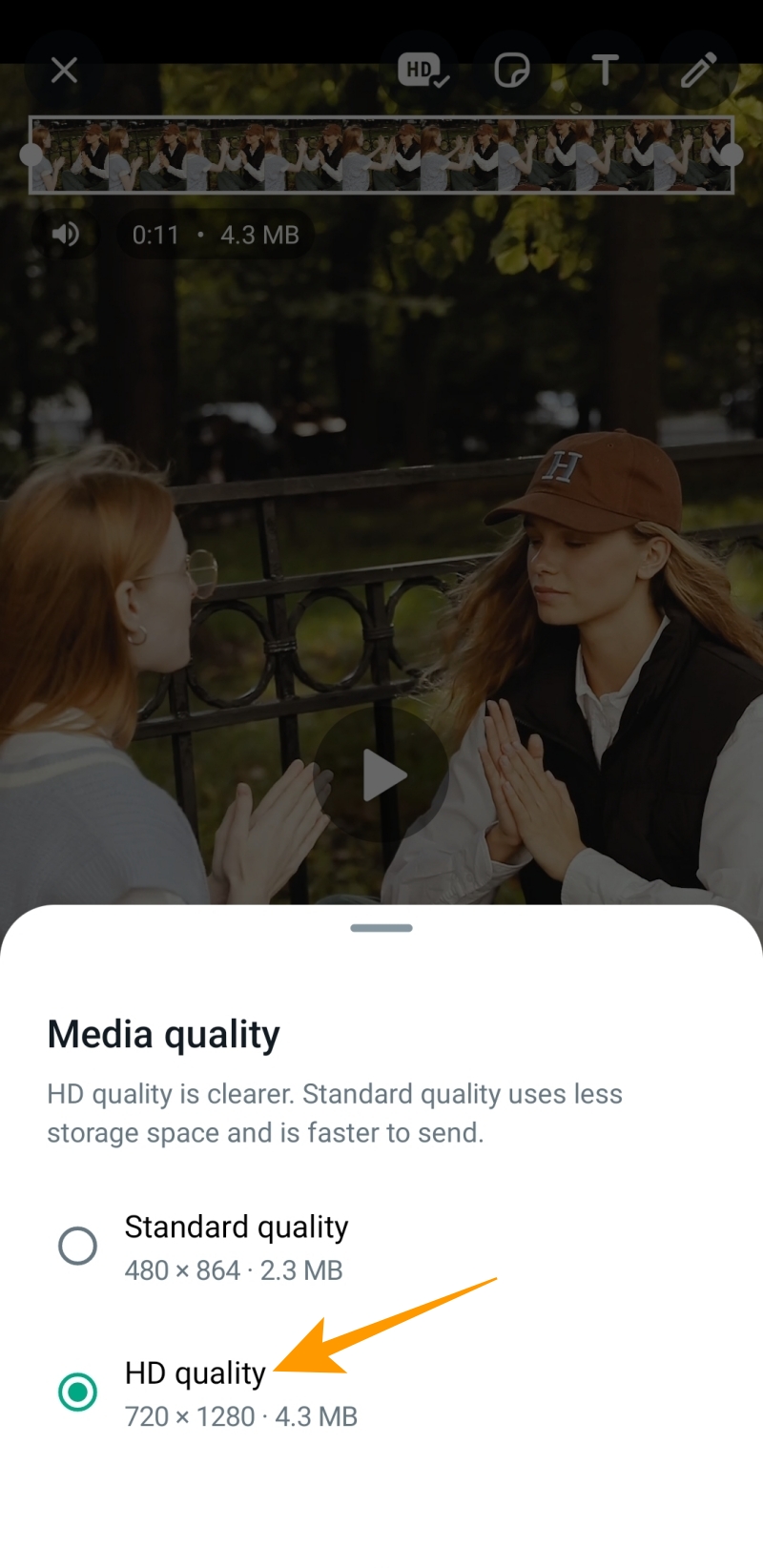
- Select the HD icon at the top toolbar.
- Choose HD quality from the Media quality popup to share your video in 720p resolution.
- Tap the send icon to send the video.
Once you share a video in HD quality, it will appear with an HD tag in WhatsApp conversations.
Like HD pictures, WhatsApp will compress HD videos and allow you to share them in 720p resolution. So, even if you want to send large video files with a 4K or 8K resolution, WhatsApp will still compress them for sharing in up to 720p resolution.
WhatsApp Will Compress Your Media Files
There are some effective tricks that have helped users send photos in original resolution in WhatsApp over the years, as the messaging service lacked HD photo-sharing capability. But that’s not the case anymore. You can directly share HD-quality photos on WhatsApp with the new HD picture-sharing feature. And while sharing videos in 720p resolution might not seem like a big deal, it brings a significant jump in quality.
Remember that WhatsApp will compress the photos and videos in both cases to reduce their size. So, if you want to send a picture in its original quality, we advise you to share it as a document file. Nonetheless, now that you know how to share HD-quality photos and videos, here’s how to check whether your WhatsApp message was read.
FAQs
A. To get high-resolution photos on WhatsApp, open the chat you want. Tap the paperclip icon to go to Gallary and choose an image to share on WhatsApp. Tap the HD icon and select your desired photo quality for sharing. Lastly, tap the share icon to get high-quality photos shared on WhatsApp.
A. To send full-resolution photos on WhatsApp’s iPhone app, open a chat and tap the (+) icon. Tap on Photo & Video Library to choose an image. Tap the HD icon at the top and choose the desired photo quality for the picture. Now tap the send icon to send your picture in HD quality.
Can You View Someone’s Old Instagram Stories?
Read Next